yash (Yet Another SHell)
ULFG II - Sem VII E - OS final project
The code can be found here.
I. Introduction
I.1 What is a shell?
An Operating System is made of many components, but its two prime components are the kernel and the shell:
The kernel is basically the layer on top of the hardware of the computer, which contains basic scripts which lets the software part of applications communicate with the hardware. In other words, the kernel is the actual component of the OS which talks to the hardware, creates the concepts of processes and threads so that both the userspace OS services and the actual user apps can run in a safe manner.
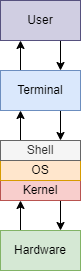
The shell, however, will actually be a “shell” on top of the kernel, and will be written using kernel scripts and system calls, which will create variations of the built in commands of Unix.
A shell is a program that takes command inputs from the user’s keyboard and passes them to
the machine (and more precisely the kernel) in order to execute them.
So in general, a shell is a user interface that allow the user to harness the services of a
computer. It can be a command-line interface – like the one we will build- or a graphical user
interface.
A lot more definitions can be written about the shell. However, in one line -
A shell is an interface that allows users to interact with the kernel of an operating system.
I.2 History of Unix shells
Shells have a long history. It begins with the first Unix shell. Ken Thompson developed the first shell for Unix called the V6 shell in 1971. Similar to its predecessor in Multics, this shell (/bin/sh) was an independent user program that executed outside of the kernel. Though rudimentary by modern standards, it introduced many of the basic features common to all later Unix shells, including piping,and simple control structures using if and goto. Though not in current use, it is still available as part of some Ancient UNIX systems.
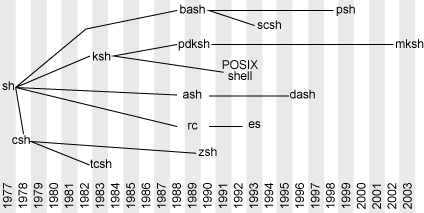
Beyond the Thompson shell, in 1977, the Bourne shell was introduced. The Bourne shell, created by Stephen Bourne at AT&T Bell Labs for V7 UNIX, remains a useful shell today. The author developed the Bourne shell after working on an ALGOL68 compiler, so its grammar is more similar to the Algorithmic Language (ALGOL) than other shells. The source code itself, although developed in C, even made use of macros to give it an ALGOL68 flavour.
The Bourne shell led to the development of other shells, such as the Korn shell (ksh), Almquist shell (ash), and the popular Bourne Again Shell (or Bash).
The below figure shows the development of different types of shells:
II. Design and Implementation
II.1 How does a shell work?
II.1.1 Basic lifetime of a shell
Let’s look at a shell from the top down. A shell does three main things in its lifetime:
- Initialize: the shell reads and executes its configuration files. These change aspects of the shell’s behavior.
- Interpret: the shell reads commands from stdin (which could be interactive, or a file) and executes them.
- Terminate: After its commands are executed, the shell executes any shutdown commands, frees up any memory, and terminates.
II.1.2 Basic workflow of the shell
When starting up a UNIX shell, this shell will be the main loop which will continuously wait for the user input, parse this input, and at last execute them, and it will reenter the loop to accept new user input. To visualize it better, the workflow of the shell would look like this:
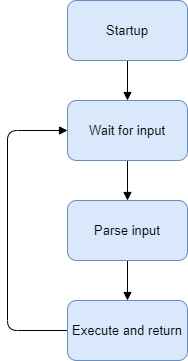
- Startup the shell
- Wait for user input
- Parse user input
- Execute the command and return the result
- Go back to
2
There is one crucial idea to all of this though: processes. The shell is the
parent process. This is the main thread of our program which is waiting for
user input. However, we cannot execute the command in the main thread itself, because
of the following reasons:
- An erroneous command will cause the entire shell to stop working, which is not a good user experience and should be avoided at all costs
- Independent commands should have their own process blocks. This is known as isolation and falls under fault tolerance.
To be able to do this, we will rely heavily on the system call fork.
Fork
When fork is called, the operating system makes a duplicate of the process and starts
them both running. The original process is called the parent, and the new one is
called the child.
fork() system call returns twice, once for each process. It returns 0 to the child
process, and returns to the parent the process ID number (PID) of its child. This means essentially
that the only way for new processes to start is by an existing process duplicating itself.
This may sound illogical and counterintuitive. When you want to run a new process, you don’t just
want another copy of the same program – you want to run a different program. That’s what the
exec() (and its variations execl, execv, execvp,
execle, execve, execlp, …) system call is all about.
exec() replaces the current running program with an entirely new one. This means that
when you call exec, the operating system stops your process, loads up the new program,
and starts that one in its place. A process never returns from an exec() call (unless
there’s an error).
With these two system calls in place, we have the underlying infrastructure for how most programs are
run on Unix. First, an existing process forks itself into two separate ones. Then, the child uses
exec() to replace itself with a new program. The parent process can continue doing
other things, and it can even keep tabs on its children, using the system call wait()
(or one of its variants like waitpid()).
Exec
To quote the linux man pages,
The exec() family of functions replaces the current process image with a new process image.
For our needs, we will use execvp whose signature looks like this:
int execvp(const char *file, char *const argv[]);
Let us take at an example usage, which executes the command ls -l -h -a:
char *argv[] = {"ls", "-l", "-h", "-a", NULL};
execvp(argv[0], argv);
A few things to note about the execvp function:
- The first argument is the name of the command (or file) to be executed, for which it will search
in the
$PATHsystem - The second argument is an array consisting of the command and the arguments passed to the
command itself. It must also be terminated by
NULL - It also swaps out the current process image with that of the command being executed
Now that we know how to execute commands, we need to develop a way to read and parse user input.
II.1.3 Parsing and tokenization
A parser scans input and breaks it down to tokens. A token consists of one or more characters (letters, digits, symbols), and represents a single unit of input. For example, a token can be a variable name, a keyword, a number, or an arithmetic operator.
The parser takes these tokens, groups them together, and creates a special structure we call the Abstract Syntax Tree. You can think of the AST as a high level representation of the command line you gave to the shell. The parser takes the AST and passes it to the executor, which reads the AST and executes the parsed command.
This is where the GNU Readline library comes into play. The GNU Readline library provides a set of functions for use by applications that allow users to edit command lines as they are typed in. Both Emacs and vi editing modes are available. The Readline library includes additional functions to maintain a list of previously-entered command lines, to recall and perhaps reedit those lines, and perform csh-like history expansion on previous commands. It provides tab auto-completion for files and folders, forward and reverse history look-up using arrows and special keyboard shortcuts, and a lot more features.
After reading, parsing, and possibly adding the user input into the command history, we need to tokenize it in order to pass it to the executor.
Let us take a look at the following function. which takes a string as the input. We use
the function strtok (available in the string.h library) to split the
string by thespace character and return an array of strings instead. We also terminate
the array by NULL.
tokenizer.c
#include  "tokenizer.h"
#include  <stdio.h>
#include  <stdlib.h>
#include  <string.h>

char  **tokenize(char  *input)
{
	char  **command  =  malloc(16  *  sizeof(char  *));

	if (command  ==  NULL)
	{
		perror("malloc failed");
		exit(1);
	}

	char  *separator  =  " ";
	char  *parsed;
	int  index  =  0;
	parsed  =  strtok(input, separator);

	while (parsed  !=  NULL)
	{
		command[index] =  parsed;
		index++;
		parsed  =  strtok(NULL, separator);
	}

	command[index] =  NULL;
	return  command;
}
Currently our command buffer allocates 16 blocks only. If we enter a command which has more than 16 words, our command will not work as expected. This has been done only to keep the example easy to understand, since there is no rule that dictates the input buffer size.
As an example, if the input to the tokenize function is the string
"ls -l -h -a", then the function will create an array of the form
{"ls", "-l", "-h", "-a", NULL} and return the pointer to this array.
II.1.4 Putting it all together
Now that we have the basic building blocks of the shell, we will do the following:
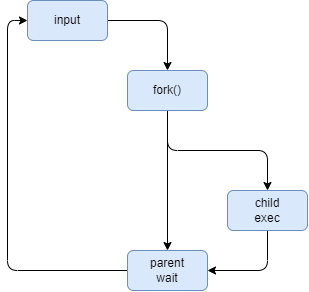
- Accept the command as user input
- Call
forkto create a child process - Execute the command in the child process while the parent waits for the command to complete
- Return back to step 1
We invoke readline() to read input from the user, and pass it to tokenize()
function defined previously. Once the input has been parsed, we fork the
main process and call execvp in the child process. Before we dive into the
code, let us take a look at the following diagram, to understand the semantics of
execvp first:
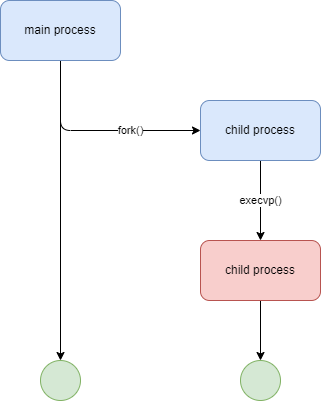
When the fork command completes, the child is an exact copy of the parent process.
However, when we invoke execvp, it replaces the current program with the program passed
to it in the arguments. What this means is that although the current text, data, heap and stack
segments of the process are replaced, the process id still remains unchanged, but the program gets
overwritten completely. If the invocation is successful, then execvp never returns, and
any code in the child after this will not be executed.
Before we take a look at the main shell loop, we will create our own custom prompt, colorized, and displaying the current working directory of the shell:
prompt.c
#include  "prompt.h"
#include  <readline/readline.h>
#include  <stdio.h>
#include  <stdlib.h>
#include  <unistd.h>

#define  KCYN  "\x1B[36m" // White color
#define  KGRN  "\x1B[32m" // Green color
#define  KWHT  "\x1B[37m" // White color
#define  PATH_MAX  256

char  *input;
char  cwd[PATH_MAX];

char  *prompt()
{
	if (getcwd(cwd, sizeof(cwd)) !=  NULL)
	{
		printf("%syash: ", KCYN);
		printf("%s%s", KGRN, cwd);
		printf("%s\n", KWHT);
		input  =  readline("$ ");
		return  input;
	}
	else
	{
		printf("%syash: ", KCYN);
		printf("%s", KWHT);
		input  =  readline("$ ");
		return  input;
	}
}
NOTE: In order to use the
readline()library, it should be installed from your distro’s package manager. e.g. on Ubuntu and Debian based distributions, use the following command:
sudo apt install libreadline-dev
Our prompt now looks like this:

Back to the main shell loop, we will add some error handling, notably for fork (if the
operating system reaches the maximum number of allowed processes or runs out of memory, a child
process will not be created and fork will return -1), and execvp: (it
returns -1 if the execution fails, but never returns following a successful invocation).
The main function now looks roughly like the following snippet of code:
int  main(int  argc, char  *argv[])
{
	char  **command;
	char  *input;
	pid_t child_pid;
	int stat_loc;
	do
	{
		input =  prompt();
		command =  tokenize(input);
		child_pid =  fork();
		if (child_pid <  0)
		{
			perror("Fork failed");
			exit(1);
		}
		else  if (child_pid ==  0)
		{
			if (execvp(command[0], command) <  0
			{
				perror(command[0]);
				exit(1); // terminate child
			}
		}
		else
		{
			waitpid(child_pid, &stat_loc, WUNTRACED);
		}
		if (!input)
			free(input);
		if (!command)
			free(command);

	} while (1);

	return  0;
}
After compiling and running the code, let us try some basic shell commands.
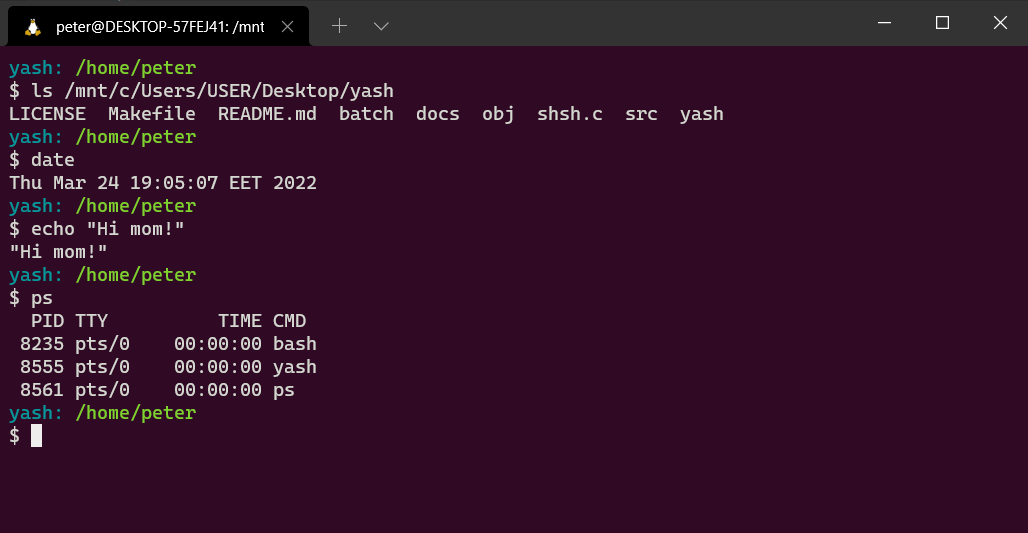
And that’s it! We’ve just finished writing our very first niche Linux shell!
II.2 Features and Improvements
II.2.1 Builtins
Although our shell currently works and executes system programs, it doesn’t do anything more
advanced. Even if you try to execute the cd command, you will get an error that says:
cd: No such file or directory
Our shell does not recognize the cd command just yet. Most commands a shell executes are
system programs like ls or pwd, but not all of them. Some of them are
built right into the shell.
The reason is actually pretty simple. If you want to change directory, you need to use the function
chdir(). The thing is, the current directory is a property of a process. So, if you
wrote a program called cd that changed directory, it would just change its own current
directory, and then terminate. Its parent process’s current directory would be unchanged. Instead,
the shell process itself needs to execute chdir(), so that its own current directory is
updated. Then, when it launches child processes, they will inherit that directory too.
Similarly, if there was a program named exit, it wouldn’t be able to exit the shell that
called it. That command also needs to be built into the shell.
Thus, to support cd we will have to implement it on our own. We also need to ensure
that, if the command entered by the user is cd (or belongs to a list of predefined
built-in commands), we will not fork the process at all. Instead, we will execute our
implementation of cd (or any other built-in) and move on to wait for the next user
input.
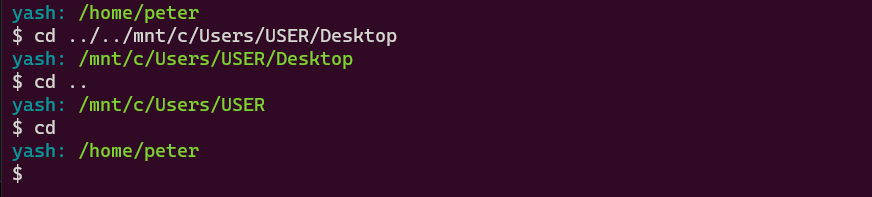
cd (change directory)
Thankfully, for cd, we have the chdir function call available to us and
using it is straightforward. It accepts the path as an argument and returns 0 upon success and -1
upon a failure.
cd.c
#include  "cd.h"
#include  <string.h>
#include  <unistd.h>
#include  <stdlib.h>
#include  <stdio.h>

int  cd(char  **args)
{
	if (args[1] ==  NULL)
	{
		// if no argument provided, cd to HOME (like bash)
		if (chdir(getenv("HOME")) !=  0)
		{
			perror("cd failed");
			return  3;
		}
	}
	else
	{
		if (chdir(args[1]) !=  0)
		{
			perror("cd failed");
			return  3;
		}
	}
	return  1;

}
Demo:
history
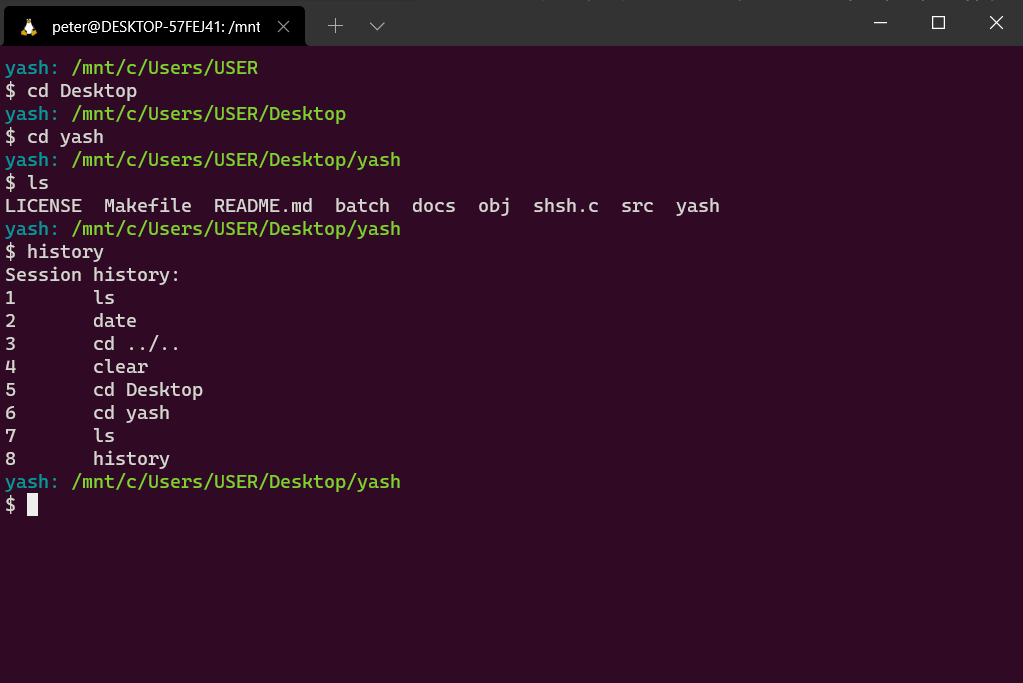
The GNU Readline library provides a history expansion in the <readline/history.h>.
We call add_history(char* input) to add the command to the commands history. Command
history can then be accessed using keyboard arrows, or special keybindings (like
Ctrl-R). In order to retrieve the history programmatically to replicate the
history command, we create a wrapper around the history_list() function.
The history built-in code is presented below.
history.c
#include  "history.h"
#include  <stdio.h>
#include  <stdlib.h>
#include  <string.h>
#include  <unistd.h>
#include  <readline/history.h>

// State of history list (offset, length, size)
HISTORY_STATE  *myhist;

// Retrieve history list
HIST_ENTRY  **mylist;

// Display history
void  display_history()
{
	myhist  =  history_get_history_state();
	mylist  =  history_list();
	printf("Session history:\n");
	for (int  i  =  0; i  <  myhist->length; i++)
	{
		//output history list
		printf("%d\t%s\n", i  +  1, mylist[i]->line);
	}
}

// Free buffer blocks allocated to the history
void  free_history()
{
	if (!myhist)
		free(myhist); // free HIST_ENTRY list
	if (!mylist)
		free(mylist); // free HISTORY_STATE
}
Demo:
Piecing built-ins together
We can now add builtins.c file that checks if the command input by the user belongs to
the list of predefined built-in commands (in our case cd and history) and
executes it if it is the case.
builtins.c
#include  <stdbool.h>
#include  <string.h>
#include  <stdio.h>
#include  "cd.h"
#include  "history.h"

char  *builtins[]  = {"cd", "history"};
int  builtins_count  =  sizeof  builtins  /  sizeof  builtins[0];

bool  check_if_builtin(char  *input)
{
	for (int  i  =  0; i  <  builtins_count; ++i)
	{
		if (!strcmp(builtins[i], input))
		{
			return  true;
		}
	}
	return  false;
}

void  run_builtin(char  **command)
{
	if (!strcmp(command[0], "cd"))
	{
		if (cd(command) <  0)
		{
		perror(command[1]);
		}
	}

	if (!strcmp(command[0], "history"))
	{
		display_history();
	}
}
In the main loop, we can add the following snippet
if (check_if_builtin(command[0]))
{
	run_builtin(command);
	continue;	// skip the fork
}
exit
We add exit and quit commands to gracefully close the shell, by adding the
following piece of code.
if (!strcmp(command[0], "exit") || !strcmp(command[0], "quit"))
{
	exit(0);
}
We can also implement the Ctrl-D keyboard shortcut (that sends the EOF
character) to quit the shell by adding the following snippet to our main function:
// exit on ctrl-D
if (input == NULL)
{
	printf("\n");
	exit(0);
}
NOTE: Builtins might not work properly with the N-pipes and separators
(; and \n) explained below, mainly because they were added much later in
the development of the project.
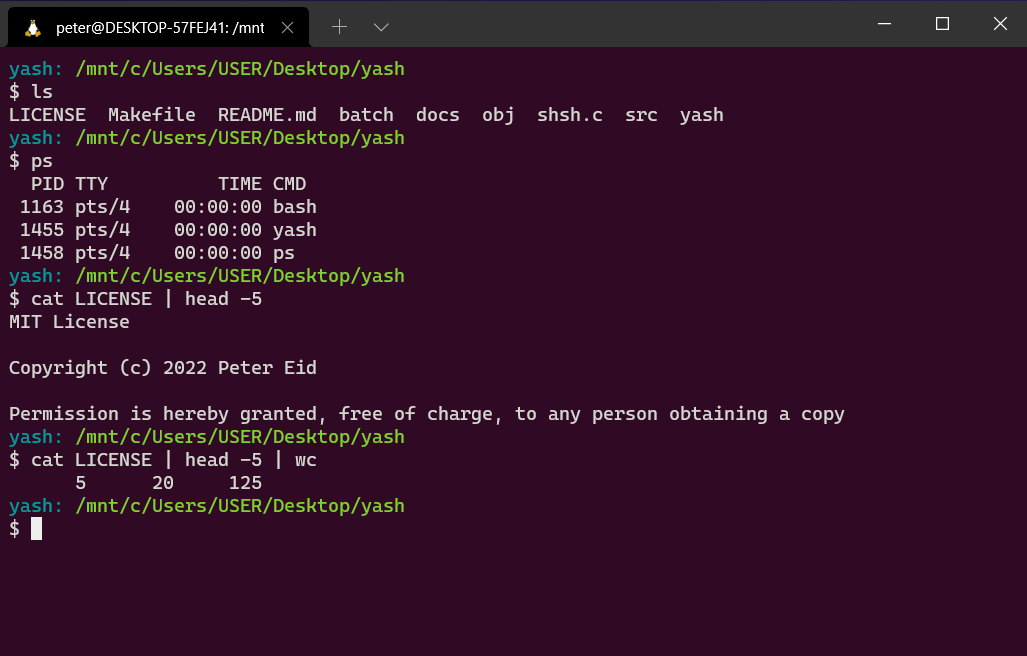
II.2.2 N-Pipes
A pipe is a form of redirection (transfer of standard output to some other destination) that is used
in Linux and other Unix-like operating systems to send the output of one command/program/process to
another command/program/process for further processing, and this command’s output may act as input
to the next command and so on. Unix/Linux systems allow stdout of a command to be
connected to stdin of another command, by using the pipe character |.
This direct connection between commands/programs/processes allows them to operate simultaneously and permits data to be transferred between them continuously rather than having to pass it through temporary text files or through the display screen. Pipes are unidirectional, i.e data flows from left to right through the pipeline.
In the N-pipe implementation of piping, the parent shell forks one child process and then waits for
it to complete. The child process is the parent of all the pipe command processes. The child creates
two pipes and then calls fork() for each of its children. Each new child process
redirects stdinand stdoutto a pipe appropriately and calls
execvp() to execute the proper command. A process that has been execvp()ed
will never return. When the child of the parent shell reaches the last command it simply redirects
stdin to the second pipe and execvp()s the last command. The parent waits
for this last command to exit. This is very important. The parent shell must wait on the last
command to finish before continuing.
One important thing to note here is that each process in the pipeline is a child of the original child of the shell. They are not children of each other the further down the pipeline we go. Another thing to note is that only the shell executes a wait, while all the others simply die after they execute their respective command.
The process that is the child of the main pipe process is responsible for creating all the needed
pipes before it forks off any of its children. Thus, each of children has a set of file descriptors
for all pipes in the total pipeline, so it is important to specify for each process exactly which
pipe file descriptor among the many it has access to is its stdin and its
stdout, using the dup2() system call, and eventually close all file
descriptors that comprise its pipes so that the pipes don’t hang.
Read below our sample implementation of the N-pipes feature:
pipes.c
#include  "pipes.h"
#include  "tokenizer.h"
#include  <sys/wait.h>
#include  <stdlib.h>
#include  <string.h>
#include  <unistd.h>
#include  <stdio.h>

int  pipes(char  *input)
{
	int  i, commandc  =  0, numpipes  =  0, status;
	pid_t  pid;
	char  **args;
	for (i  =  0; input[i] !=  '\0'; i++)
	{
		if (i  >  0)
		{
			if (input[i] ==  '|'  &&  input[i  +  1] !=  '|'  &&  input[i  -  1] !=  '|')
			{
				numpipes++;
			}
		}
	}

	int  *pipefds  = (int  *)malloc((2  *  numpipes) *  sizeof(int));
	char  *token  = (char  *)malloc((128) *  sizeof(char));
	token  =  strtok_r(input, "|", &input);

	for (i  =  0; i  <  numpipes; i++)
	{
		if (pipe(pipefds  +  i  *  2) <  0)
		{
			perror("pipe creation failed");
			return  3;
		}
	}
	do
	{
		pid  =  fork();
		if (pid  ==  0)
		{ // child process
			if (commandc  !=  0)
			{
				if (dup2(pipefds[(commandc  -  1) *  2], 0) <  0)
				{
					perror("child couldnt get input");
					exit(1);
				}
			}
			if (commandc  !=  numpipes)
			{
				if (dup2(pipefds[commandc  *  2  +  1], 1) <  0)
				{
					perror("child couldnt output");
					exit(1);
				}
			}

			for (i  =  0; i  <  2  *  numpipes; i++)
			{
				close(pipefds[i]);
			}

			args  =  tokenize(token);
			execvp(args[0], args);
			perror("exec failed");
			exit(1);
		}
		else  if (pid  <  0)
		{
			perror("fork() failed");
			return  3;
		} // fork error
		commandc++; // parent process
	} while (commandc  <  numpipes  +  1  && (token  =  strtok_r(NULL, "|", &input)));

	for (i  =  0; i  <  2  *  numpipes; i++)
	{
		close(pipefds[i]);
	}

	free(pipefds);
	while (wait(NULL) >  0)
		;
	return  1;
}
Demo:
II.2.3 Separator
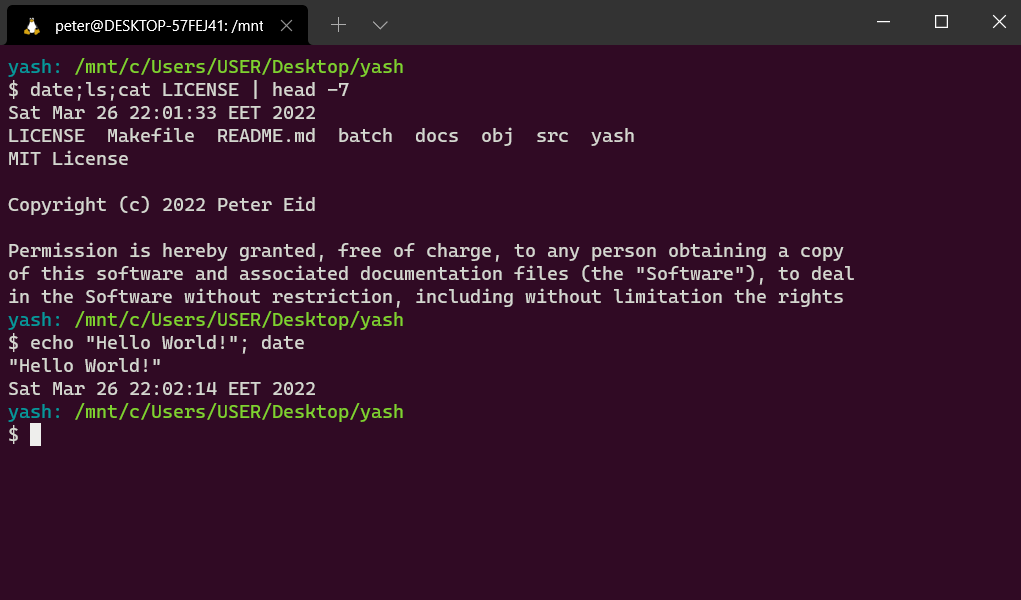
In order to put two or more commands on the same command line, they can be separated by a semicolon
;. All the commands will be executed sequentially waiting for each command to finish
before starting the new one.
When the shell sees a semicolon ; on a command line in interactive mode, it is treated
as a command separator or terminator— basically like pressing the ENTER key to execute a command.
In order to replicate this functionality in our shell, we will tokenize the input on the semicolon
; character iteratively, and on every tokenized command, we fork the main process,
execute the command in the child process, while the parent waits for everyone of them to finish.
separator.c
#include  <stdio.h>
#include  <string.h>
#include  <sys/wait.h>
#include  <stdlib.h>
#include  <unistd.h>
#include  "tokenizer.h"
#include  "pipes.h"
#include  "separator.h"

void  execute_sequence(char  *input, char*  delimiter)
{
	pid_t  pid;
	char  *token  = (char  *)malloc((128) *  sizeof(char));
	char  **command;
	token  =  strtok_r(input, delimiter, &input);
	do
	{
		if (strchr(token, '|') !=  NULL)
		{
			pipes(token);
			continue;
		}
		pid  =  fork();
		if (pid  ==  0)
		{
			command  =  tokenize(token);
			if (execvp(command[0], command) <  0)
			{
				perror("execution failed");
				exit(1);
			}
		}
		else  if (pid  <  0)
		{
			perror("fork failed");
		}
		else
		{
			wait(NULL);
		}
	} while (token  =  strtok_r(NULL, delimiter, &input));

	while (wait(NULL) >  0)
		;
}
Demo:
II.2.4 Batch mode
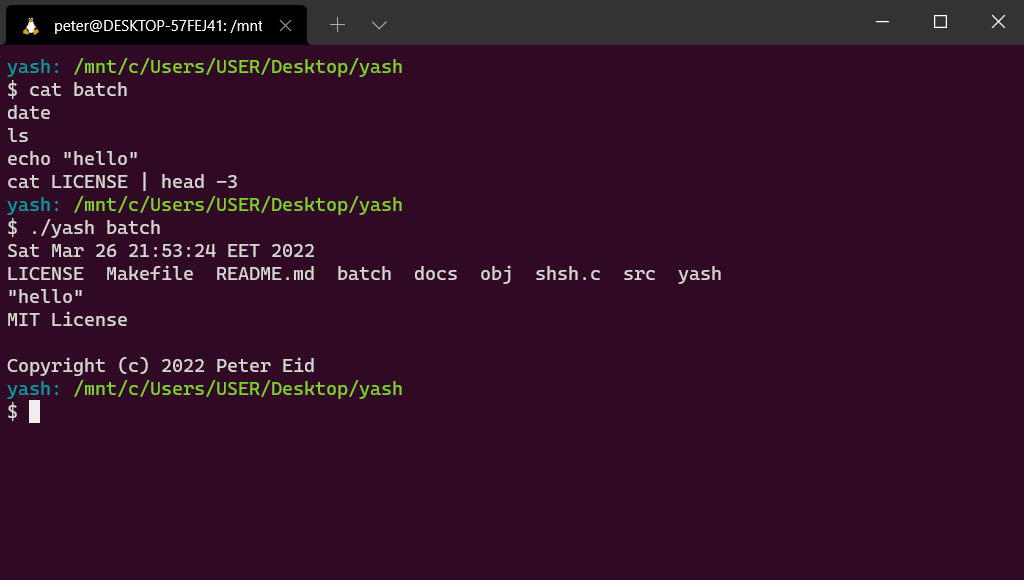
In order to support batch mode, where the shell is started by specifying a batch file containing the
list of commands that should be executed separated by a line break, we can use the same
execute_sequence() function defined above in the separator.c file, but
using the line feed character \n as the delimiter.
In our main.c function, we check if the executable was passed a command-line argument to
run in batch mode, or run in interactive mode otherwise. We then read the batch file if it exists,
and pass its content to the execute_sequence() function.
We add the following block of code to the main function.
if (argc  >  2)
{
	printf("0 or 1 arguments expected.\n");
	return  1;
}
else  if (argv[1] &&  access(argv[1], F_OK))
{
	printf("Batch file does not exist\n");
	return  1;
}
else  if (argv[1] &&  !access(argv[1], F_OK))
{
	do
	{
		FILE  *fp;
		long  lSize;
		char  *buffer;
		fp  =  fopen(argv[1], "rb");

		if (!fp)
			perror(argv[1]), exit(1);

		fseek(fp, 0L, SEEK_END);
		lSize  =  ftell(fp);
		rewind(fp);

		/* allocate memory for entire content */
		buffer  =  calloc(1, lSize  +  1);
		if (!buffer)
			fclose(fp), fputs("memory alloc fails", stderr), exit(1);

		/* copy the file into the buffer */
		if (1  !=  fread(buffer, lSize, 1, fp))
			fclose(fp), free(buffer), fputs("entire read fails", stderr), exit(1);

		execute_sequence(buffer, "\n");
		fclose(fp);
		free(buffer);
		break;

	} while (1);
	return  0;
}
Demo:
II.2.5 Signals
What is a signal?
A signal is a software interrupt that is sent out to a process from an external event, either by by
the kernel, by another process or by itself. A very common example is SIGINT, which is
the signal that is sent out when you hit Ctrl-C to exit a program.
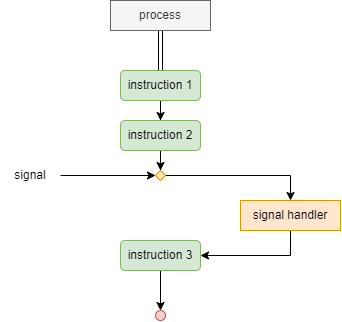
In the diagram above, the process receives an external signal after the second instruction, hence interrupting its the regular execution to pass it to the signal handler, a predefined function that is invoked whenever a signal is received.
Currently, if we send the SIGINT signal by pressing Ctrl-C before a command
finishes running (like sleep 10), not only the program command quits, but our shell as
well. The same behavior occurs if we send the SIGSTP signal generated by the
Ctrl-Z keyboard shortcut. This is because our shell is using the operating system’s
default signal handlers, which we can thankfully override in our C code.
Before we get to the code, we will introduce two important concepts: signal masks and non-local jumps.
Signal masks
For every process running in the system, the kernel maintains a signal mask, which blocks any signal that is added to it from being delivered, which can be useful when we wan to block signals based on application logic.
Let us consider, for example, that the signal handler gets invoked and is executing its instructions, then another signal invokes this same signal handler once again, which will interrupt the execution of the original signal interrupt, and this is not very desirable.
This is why, in order to prevent a signal handler from interrupting itself, the original signal that invoked the signal handler should be added to the signal mask, and should only be removed once the signal handler returns
Non-local Jumps
When our shell encounters Ctrl-C, the execution of the command currently running should
be interrupted, restarting the main while loop from the top, and displaying the shell prompt.
Effectively, Ctrl-C would mean a soft reset of the command line. This brings us to the
functions sigsetjmp() and siglongjmp(), which are used to perform a
non local jump. They are equivalent to a goto, but are not restricted
within the scope of the function.
The sigsetjmp(sigjmp_buf env, int savesigs) function sets a jump point and takes a
buffer of type sigjmp_buf which is used to store details like the stack pointer and the
instruction pointer. It also accepts a flag savesigs. If the value of this flag is non
zero, then sigsetjmp() saves the current process signal mask and restores it when
siglongjmp() is invoked. This means, that the signal which initially gets blocked on
invoking the signal handler, gets unblocked as soon as siglongjmp() is invoked.
The siglongjmp(sigjmp_buf env, int val) function uses the buffer which contains values
saved by sigsetjmp() to determine the jump point in the program. Additionally it takes
an integer value, which is returned when the code returns to the jump point.
In order to guarantee that a signal will only be delivered after the jump point has been set, we add
a global flag that is false by default. Once the jump point has been set, we set the
flag to true and add a check on this flag in our signal handler. If the flag is
false, we skip the call to siglongjmp() and return from the handler
instead.
IMPORTANT: It is essential that this flag is of type
volatile sig_atomic_t, since it will be accessed asynchronously by multiple threads of
the process, i.e. the main thread and the signal handler thread. The type guarantees atomic access
to the variable across multiple threads.
The code
We are now ready to handle signals and interrupts in our program. We will take advantage of the
sigaction struct an sigaction() function available in the
signal.h library.
struct sigaction {
    void     (*sa_handler)(int);
    void     (*sa_sigaction)(int, siginfo_t *, void *);
    sigset_t   sa_mask;
    int        sa_flags;
    void     (*sa_restorer)(void);
};
The struct requires:
sa_handler: A pointer to the signal handler.sa_sigaction: A pointer to a signal handler that can access more information regarding the signal. Either one ofsa_handlerorsa_sigactionshould be used.sa_mask: An optional set of signals which are blocked while the signal handler is executing.sa_flags: Abitwise ORof config flags.sa_restorer: This is for internal use and should not be set.
Now let us look at the signature of the sigaction() function:
int sigaction(int signum, const struct sigaction *act, struct sigaction *oldact);
It accepts the signal number and two sigaction struct objects. The first contains new
configuration to be set, while the second is used to save the current configuration before
overwriting it with the new one.
In our main.c file, we add the 2 following functions:
void sigint_handler(int signo)
{
	if (!jump_active)
	{
		return;
	}
	siglongjmp(env, 42);
}

// SIGINT setup
void sigint_setup()
{
	struct sigaction s;
	s.sa_handler = sigint_handler;
	sigemptyset(&s.sa_mask);
	s.sa_flags = SA_RESTART;
	sigaction(SIGINT, &s, NULL);
}
where env and jump_active are 2 static global variables declared as
static sigjmp_buf env;
static volatile sig_atomic_t jump_active = 0;
And in order to enable signal handling in our program, it boils down to calling the
sigint_setup() at the start of the main process as well as for every forked child.
III. Conclusion
Obviously, the shell we created is not feature-rich and is missing some important features available
in other Unix shells, from output redirection (like >, >>,
<, …) to symbolic tables, scripting capabilities, and the huge set of builtin
commands that make other Unix shells (notably bash and zsh) as powerful as they
are. The implementation of all of this stuff is really interesting, but way more than we could ever
fit in a project like this.
- Resources
- Unix/Linux: What is a Shell
- Cornell CS414: Writing Your Own Shell
- Making your own Linux Shell in C
- Mohammed Isam’s articles on HackerNoon
Special thanks to Dr. Ghaoui
- Authors
- AVEDIS Razmig
EID Charbel
EID Peter